
MoreCobblemonTweaks
A qol cobblemon client mod introducing pc box names, wallpapers, and more!
2.7M
179
MoreCobblemonTweaks
A qol cobblemon client mod introducing a variety of small but nice features. MoreCobblemonTweaks was the predecessor of the official PC search, box names, and box wallpapers system that was implemented in Cobblemon 1.7 by yours truly! They have since been removed from this mod, but there are still plenty of other features.
Config
- All of the features listed in the section below can be individually tweaked in the mod's config. You can change them in the config file itself located in
configs/more_cobblemon_tweaks.jsonor if mod menu & cloth config are installed, by using the in game editor (recommended).
Supported Versions
Cobblemon: 1.6.1+
Cobbreeding: 1.8.8+
BetterBreeding: Most
Features
- Enhanced Item Lore
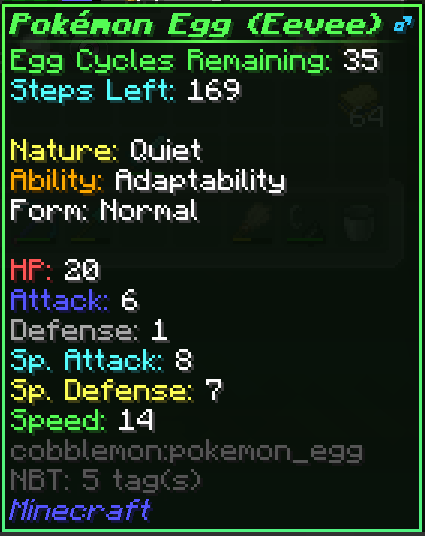
- Enhanced Egg Lore (Supports: Cobbbreeding, and BetterBreeding)
- Eggs will now show any stored data in the tooltip!
- What data is showed is determined by what egg mod you are using & your servers config.
- Below is a screenshot of an egg from HulisCobblebreeding (previously supported), which gives an example of what you can expect to see.
- Optionally (enabled by default) a shiny egg will have a gold star next to its name
- Optionally (enabled by default) a perfect iv egg will have a aqua triangle next to its name
- Optionally (enabled by default) a 0 iv egg will have a red hazard triangle next to its name
- All of the above symbols can be replaced with text lines in the lore by a config option as well
- Enhanced Berry, Consumables, & Held Item Lore were removed as all are builtin to base cobblemon from 1.6+
- Enhanced Egg Lore (Supports: Cobbbreeding, and BetterBreeding)
- PC Enhancements
- Search/Filter Autocomplete
- When typing in the filter bar at the bottom of the screen you will now get autocomplete suggestions for search/filter terms!
- Multiselect & Release
- Adds a new button on the bottom right of the ui that will enable/disable multiselect mode.
- While in the mode you can click individual slots to (de)select them, or shift+click to (de)select a range of slots.
- While you have slots selected you can use the release button as normal to release all selected pokemon at once. Or you can move them around to other boxes as a group.
- In the image below you can see an example of selecting three pokemon at once.

- Search/Filter Autocomplete
- More coming soon! (Please feel free to make suggestions via Issues!)
Совместимость
Minecraft: Java Edition
1.20.1–1.21.1
Создатели

justahuman-xd
Владелец
Детали
Лицензия:GPL-3.0-only
Опубликован:1 год назад
Обновлён:2 дня назад